







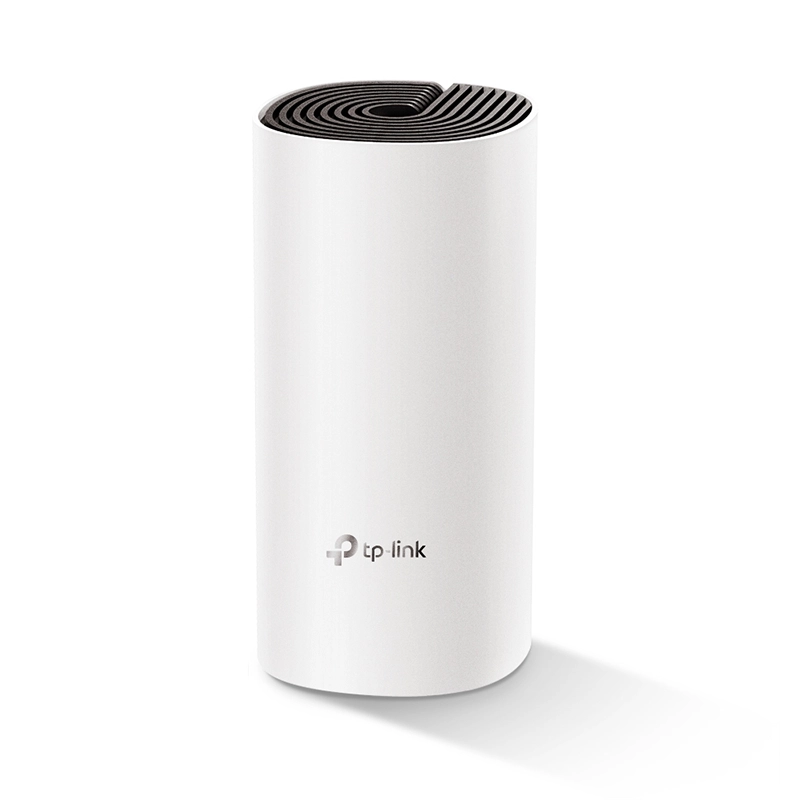

TP-Link Deco M4 AC1200 Whole Home Mesh Wi-Fi System (1-Pack)

SKU: DECO-M4-1P Brand:

Out of stock

Out of stock

0 People watching this product now!

Payment Methods:

Description

Experience Wi-Fi Like Never Before

Deco M4 uses TP-Link Mesh technology to cover your entire home in powerful Wi-Fi. Multiple units seamlessly work together to create a home network like nothing you’ve ever experienced.

Wi-Fi Dead-Zone Killer

Deco M4 is the simplest way to guarantee a strong Wi-Fi signal in every corner of your home up to 2,800 square feet (2-pack, EU version)†. Wireless connections and optional Ethernet backhaul work together to link Deco units, providing even faster network speeds and truly seamless coverage.
Want more coverage? Simply add another Deco.

Seamless Roaming with One Wi-Fi Name

TP-Link Mesh means Deco units work together to form one unified network. Your phone or tablet automatically connects to the fastest Deco as you move through your home, creating a truly seamless Wi-Fi experience‡.

Engineered for More Devices

Deco products are aimed to dramatically improve capacity and efficiency in traffic-dense environments. No matter how many screens or devices are on at once, everyone is able to enjoy a more efficient network that loads faster without dragging down performance.†

2-in-1 Router and Access Point Modes

Flexible and multifunctional, the Deco M4 includes a variety of features allowing it to serve as a router or access point. Just choose the mode for your actual network demands and experience the maximum wireless flexibility.

App-Based Setup

Installing Deco M4 is fast and easy. Just unpack the system, download the Deco app and follow its onscreen directions.

Easy Management

Manage your Wi-Fi at home or away in the Deco app, including seeing the connected devices, prioritizing your devices, setting up a guest network and more.

Voice Control

Pair with Alexa to control Deco M4 with simple voice commands. Enjoy the convenient life.

Robust Parental Controls

Simple, intuitive parental controls make it easy to keep your children safe while they’re online.

All Decos Work Together

Deco M4 is compatible with every other Deco model to form a Mesh network. Expand Mesh Wi-Fi coverage anytime by simply adding more Decos.

Specifications

Weight1 kg
Dimensions25 × 15 × 10 cm
WirelessStandards and Protocols — Wi-Fi 5 – IEEE 802.11ac/n/a 5 GHz – IEEE 802.11n/b/g 2.4 GHz WiFi Speeds — AC1200 – 5 GHz: 867 Mbps (802.11ac) – 2.4 GHz: 300 Mbps (802.11n) WiFi Range — 3-5 Bedroom Houses (3-pack) — TP-Link Mesh Technology – Optional Ethernet backhaul work together to link Deco units to provide seamless coverage — 2× Antennas (Internal) – Multiple antennas form a signal-boosting array to cover more directions and large areas — Beamforming – Concentrates wireless signal strength towards clients to expand WiFi range WiFi Capacity — Medium — Dual-Band – Distribute devices to different bands for optimal performance — MU-MIMO – Simultaneously communicates with multiple MU-MIMO clients Working Modes – Router Mode – Access Point Mode
SecurityNetwork Security – SPI Firewall – Access Control Guest Network – 1× 5 GHz Guest Network – 1× 2.4 GHz Guest Network WiFi Encryption – WPA-Personal – WPA2-Personal
HardwareEthernet Ports – 2× Gigabit Ports *Per Deco Unit – Supports WAN/LAN auto-sensing Buttons – Reset Button
SoftwareProtocols – IPv4 – IPv6 Parental Controls – URL Filtering – Time Controls WAN Types – Dynamic IP – Static IP – PPPoE – PPTP – L2TP Quality of Service – QoS by Device Cloud Service – OTA Firmware Upgrade – TP-Link ID – DDNS NAT Forwarding – Port Forwarding – UPnP IPTV – IGMP Proxy – IGMP Snooping – Bridge – Tag VLAN DHCP – Address Reservation – DHCP Client List – Server DDNS – TP-Link Management Features – Deco App
OtherNetwork Services Enabled by Default — Web Server – Manage and configure device through web (HTTP/HTTPS) • Port: 80/443   Protocol: TCP — DNS – DNS • Port: 53   Protocol: TCP & UDP — DHCP Server – IP address assignment (DHCP) • Port: 67   Protocol: UDP — App management – Manage and configure device through app • Port: 22   Protocol: TCP • Port: 20001   Protocol: TCP • Port: 30001   Protocol: TCP • Port: 20002   Protocol: UDP
Test DataWiFi Transmission Power – CE: <20 dBm (2.4 GHz) <23 dBm (5 GHz) - FCC: <30 dBm
PhysicalDimensions (W×D×H) – 3.6 × 3.6 × 7.5 in (90.7 × 90.7 × 190 mm) Package Content — Deco M4 (3-pack) – 3 Deco M4R Units – 1 RJ45 Ethernet Cable – 3 Power Adapters – 1 Quick Installation Guide — Deco M4 (2-pack) – 2 Deco M4R Units – 1 RJ45 Ethernet Cable – 2 Power Adapters – 1 Quick Installation Guide — Deco M4 (1-pack) – 1 Deco M4R Unit – 1 RJ45 Ethernet Cable – 1 Power Adapter – 1 Quick Installation Guide
OthersSystem Requirements – Android 5.0 or later – iOS 9.0 or later *Note: The minimum system requirements will be updated alongside updates to the app, subject to official website information. Certifications – CE, FCC, IC, NCC, BSMI, IDA, RCM, JPA, JRF, VCCI, KC, RoHS Environment – Operating Temperature: 0℃~40℃ (32℉ ~104℉) – Storage Temperature: -40℃~70℃ (-40℉ ~158℉) – Operating Humidity: 10%~90% non-condensing – Storage Humidity: 5%~90% non-condensing
Warranty1 Year

Customer Reviews

0 reviews
0
0
0
0
0

There are no reviews yet.

Only logged in customers who have purchased this product may leave a review.